MailBeez Analytics Advanced
Plan availability
You know you are sending a lot of emails, but you want to evaluate the success of your email campaigns and individual emails to understand what’s working and what’s not. Get detailed analytics for your MailBeez email sends with MailBeez Analytics Advanced.
The new Analytics Advanced gathers data from all installed modules and consolidates it into easily readable graphs and lists. Using the familiar metrics found in the Beez-O-Graph dashboard, Analytics Advanced tells you how your MailBeez email campaigns are really performing.
MailBeez Advanced Analytics metrics include:
- Emails sent, Open rate, Open rate mobile, Click rate, Order rate, and revenue subtotal.
- Metrics for each installed module that sends emails.
- Metrics for each email configured within a particular module
Beez-O-Graph
The familiar Beez-O-Graph dashboard is a powerful widget with an intuitive graph display that provides you with a visual report of your daily MailBeez Analytics data, such as number of emails sent, number of emails opened, number of email links clicked, number of products ordered as a result of your emails, and number of customer opt-outs.
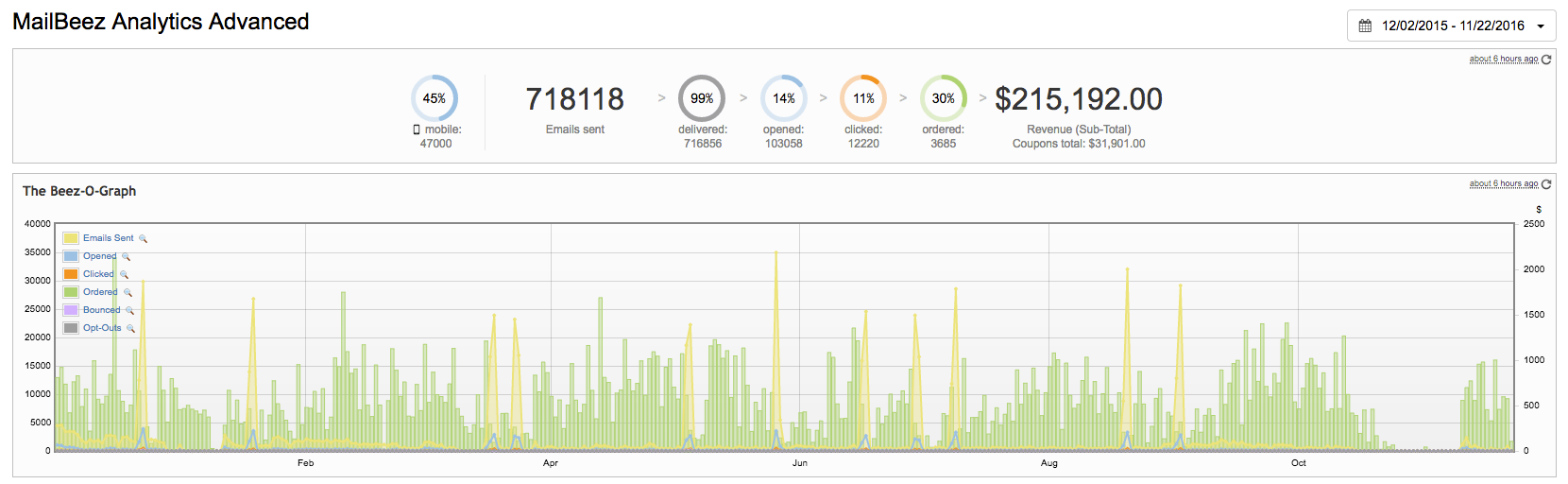
Click in Beez-O-Graph to get detailed data for the selected module. Click on an entry to open Customer Insight for detailed analytics into individual customer orders, or to view the specifics of the email sent.
What can you do with Analytics Advanced? With MailBeez Analytics Advanced, you can answer questions like:
- How are our email initiatives performing overall today?
- Which email in a particular module is the most effective?
- Which module is performing the best
Leaderboard

Displays a ranking of the top content based on relevant parameters. The dashboard listings change to reflect the filtering that is applied.
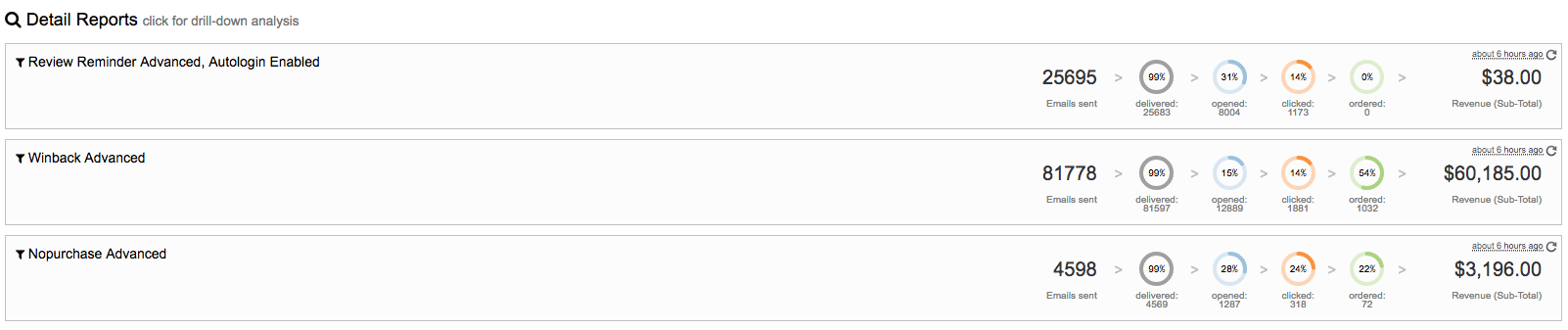
Detail Reports - (filtering)
Lets you drill-down and analyze subsets of your email sends. This is a filtering of the data that appears in a given report view. Click on the segment to initiate the filter, click again to remove it. Filter by emails sent, open rate, open rate mobil, click rate, ordered and by email type and date.
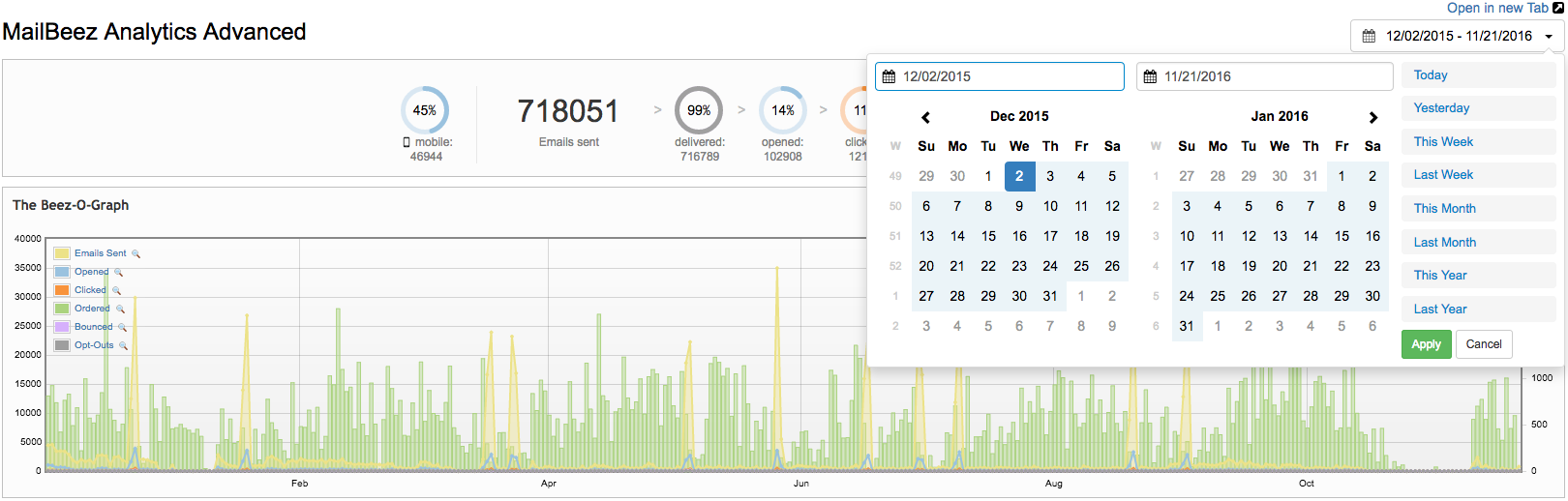
Date Picker
Select records to analyze between a range of dates. The Date Picker allows you to view report data by any timeframe desired, from 1 day to the entire period of time for which data exists, or any part thereof. The date range feature makes it easy to specify either a standard timeframe (such as a week, month, or year), or any custom timeframe.
Refresh
Use the refresh icons to manually refresh your MailBeez analytics data. Refreshing the data updates the graph that’s being shown so that the most current information is displayed. You can refresh data for individual graphs and dashboards independently.
Compatibility
-
 Gambio
GX2–GX5
Supported
-
 Modified Shop
1.x / 2.x / 3.x
Supported
-
 Zen Cart
1.3.x / 1.5.x / 2.x
Supported
-
osCommerce 2.xSupported
-
MailBeez.io API V2Not supported
Changelog
v5.0
11.03.2026
- Improved
- MailBeez V5 support
v4.4.1
15.01.2024
- Improved
- PHP8.2 refactoring
v4.4.0
02.03.2023
- New
- revenue by mail
- opening in timeframe this year
- Improved
- PHP8 refactoring
v4.3.0
14.10.2022
- Improved
- PHP8 refactoring
v4.2.0
21.04.2020
- Improved
- PHP7.4 refactoring
- Support for 4.0 Core Framework
v4.1
07.12.2018
- Improved
- framework enhancements
v4.0
25.09.2018
- Improved
- PHP7.2 refactoring
- Upgrade to 4.0 Pro Framework
v2.52
01.11.2017
- Improved
- refactoring
v2.51
04.10.2017
- Improved
- server compatiblity app_path
- minor improvements
v2.5
14.11.2016
- Improved
- wording (english)
- button in reports section now opens in new tab
v2.4
07.10.2016
- Improved
- minor fixed
- supporting MailBeez framework updates
v2.3
27.09.2016
- Improved
- wording
- Bugfix
- level indent
v2.2
27.09.2016
- Improved
- popup integration
- open in new tab option
v2.1
27.09.2016
- Bugfix
- javascript handling of values with leading currency strings
- layout issues
v2.0
26.09.2016
- New
- initial public release
v1.9
26.09.2016
- New
- beta 1.9 release
v1.2
18.09.2016
- New
- beta 1.2 release
v1.1
18.09.2016
- New
- beta release
v1.0
12.09.2016
- New
- init