Content Engine
Adds rulebased personalised product recommendations to any MailBeez Email.
When editing an email template just add the content element Live Content and configure the settings to add product recommendations.
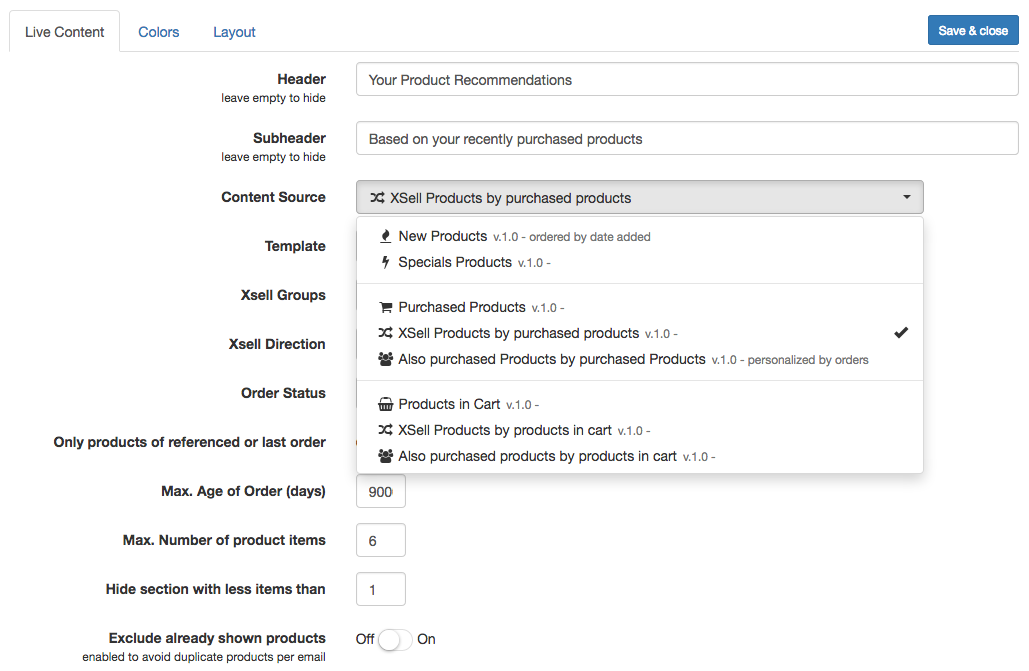
You can select from the following choice of content sources which define how recommendations are retrieved. Depending on the selected content source you will find a number of configuration options.
Tip
For order related recommendations (e.g. "also purchased") please configure the relevant order status and the timeframe of the orders to use for retrieving recommendations. This allows you to configure how fast the seasonal buying behaviour influences the recommendations.
Catalog-based product recommendations
Featured Products
Shows the products marked as "featured"
New Products
Shows the configured number of new product items, sorted by date
Specials Products
Shows the configured number of special product items, sorted by date
Product recommendations by purchased products
XSell-Product by purchased products
Shows xsell products based on previously purchased products
Also purchased products by purchased products
Shows also purchased products based on previously purchased products
Product recommendations by products in cart
Products in Cart
Shows the products in cart
XSell-Products by products in cart
Shows xsell products based on products in cart
Also purchased products by products in cart
Shows also purchased products based on products in cart
Note
Zen-Cart: XSell bases sources will only be available with the installed addon Cross Sell Advanced
Unique products only
You can add multiple content elements of type Live Content - just active the option "Exclude already shown products" to make sure only unique products are shown, e.g. in case a product is both new and a specials products and you have added both Live Content of type "New Products" and "Specials Products"
FSK18- and Group-Check
The store systems Modified-Shop and Gambio allow to tag products with "FSK18" and "group" permissions. By default the content engine will respect these settings to make sure only appropriate products are recommended. If you like you can deactivate this setting. On other store systems this configuration option is hidden.
Compatibility
-
 Gambio
GX2–GX5
Supported
-
 Modified Shop
1.x / 2.x / 3.x
Supported
-
 Zen Cart
1.3.x / 1.5.x / 2.x
Supported
-
osCommerce 2.xSupported
-
MailBeez.io API V2Supported