Content Engine
Insert product recommendations using a Live Content block
For settings in the current app, start with System. Browse the legacy reference.
Add a Live Content block when a campaign should recommend products. Choose a source that matches the email. A cart reminder can show products in the cart, while a reorder email can suggest items bought with the customer’s previous purchase.
Match the recommendation to the reason for the email. A reminder about an unfinished purchase should still make sense when the customer reads the product list below it.
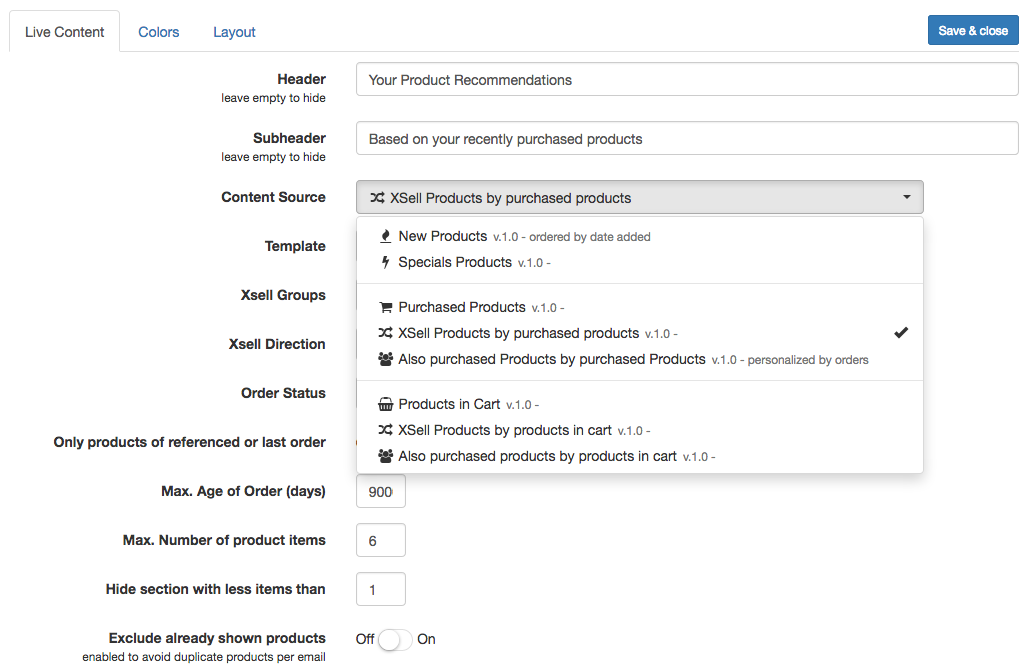
- Catalog
Choose featured products, new products sorted by date, or specials. - Past purchases
Show cross-sell or frequently bought-together items based on what the customer purchased. - Cart
Show the cart contents, cross-sell items or products frequently bought with items in the cart.
For order-based sources, choose which order statuses and how much order history to consider. A shorter window gives recent seasonal purchases more influence. On Zen Cart, cross-sell sources require Cross Sell Advanced.
If you add several blocks, enable Exclude already shown products to prevent a product appearing twice. Modified-Shop and Gambio respect FSK18 and customer-group restrictions by default. Check these before changing the optional restriction setting. Other platforms do not show it.
Compatibility
-
 Gambio
Supported
-
GambioCloud
Supported
-
 Modified-Shop
Supported
-
 Zen Cart
Supported
-
 Shopify
Unconfirmed
-
 WooCommerce
Unconfirmed
-
 JTL-Shop
Unconfirmed
-
 Shopware
Unconfirmed
Shopify, WooCommerce, JTL-Shop and Shopware share one hosted feature set. Ask MailBeez Services about connector availability. Compatibility