Customers
How many customers ordered this month? How many had bought from you before? Open Reports → Shop → Customers to see both counts. A customer who registered last year and placed a second order this month counts as a repeat buyer this month.
Read customer development
- Select Customer development. Choose the reporting period and check the dates on the card. Keep the same customer group selected when comparing figures.
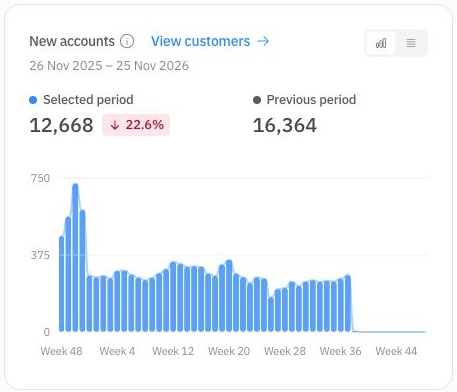
- Read New accounts alongside Purchasing customers. The first counts registrations. The second counts customer accounts with a qualifying order during the period. A customer can register and order in different periods.
- Compare Repeat buyers with the previous period. Each account with a second or later qualifying order counts once in the period total. If the card shows View customers, open it to see the matching accounts. For purchase patterns, choose Buying behaviour.
Interpret a change
In this example, registrations fell from 16,364 to 12,668, a decrease of 22.6%. Before changing a welcome campaign, check whether Purchasing customers also fell. Registrations alone cannot tell you how many of those new accounts placed a first order.
For an individual customer’s order history, open Contacts → Customers.