Reviews
If your average rating drops, open Reports → Shop → Reviews and look at the number of reviews behind it. One disappointed buyer can move the average in a quiet week. Several comments about the same damaged item give you a specific product or parcel to check.
The Reviews report is hidden in hosted accounts. You can still ask for product reviews if that automation is set up for your shop. Follow the steps below when the report is available.
- In Overview, select the period you want to investigate. Read the average alongside the number of reviews.
- In Rating distribution, select a star count to open the matching reviews. Read several before drawing a conclusion about a product or about service.
- Use Product reviews for product feedback. If your shop also collects store reviews, open Store reviews to investigate the shopping experience separately.
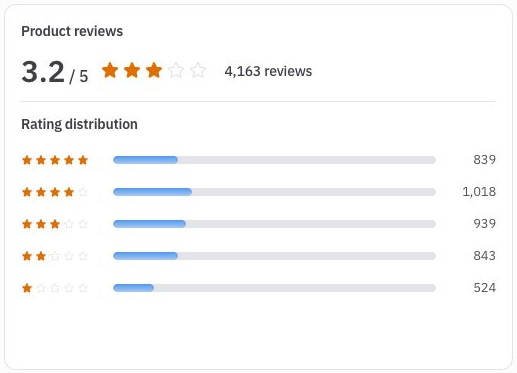
In this example, 524 of 4,163 reviews gave one star. Open that row to check whether buyers describe the same issue. A period with no reviews has no average rating.