Email performance
When clicks fall, check the sends first. Fewer clicks are easier to explain if you also sent fewer emails. If you sent about as many as before, compare recorded opens and clicks, then inspect the offer and its main link.
- Open Reports → MailBeez → Email performance → Overview. Select a reporting period that includes the send.
- In Beez-O-Graph, compare sends, recorded opens and clicks with the previous period. Its click percentage uses recorded opens as the denominator.
- Check attributed orders and revenue alongside the engagement figures. They show purchases MailBeez linked to email activity. To estimate additional sales caused by a campaign, you would need a comparison group.
Read the click rate
In this 90-day example, MailBeez recorded 43,528 sends, 17,181 opens and 1,115 clicks. Dividing 1,115 by 17,181 gives the 6.5% shown under clicked.
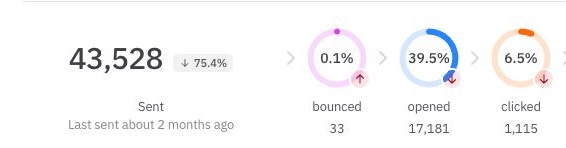
To investigate which campaign contributed to the change, open Flows & newsletters.
To work through a fall from 60 clicks to 30, follow Find out why newsletter clicks fell.